Architecture
Deconst is distributed as a set of Docker containers, deployed to a cluster of CoreOS hosts by an Ansible playbook. Containers are organized into sets of linked services called “pods.” Deconst can be scaled by both launching additional worker hosts and by starting a greater number of pods on each host.
Note
The name “pod” is taken from Kubernetes, but I’m using it to mean something slightly different here. A Kubernetes pod is also a set of related containers, but they share networking and cgroup attributes, which our pods do not do. The containers within a Deconst pod are only related by regular Docker network links.
I’m not changing it now because there’s a good chance we will be on Kubernetes at some point.
This is how the world interacts with a Deconst cluster:
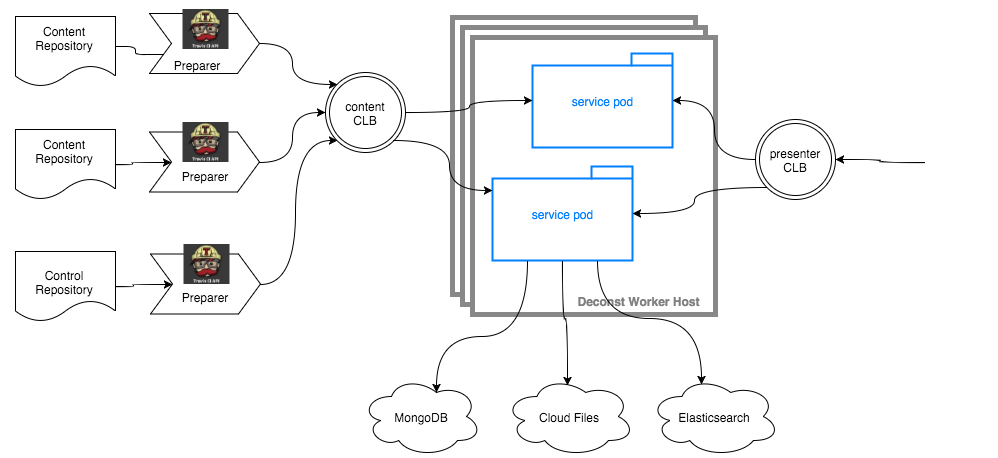
None of the service containers store any internal, persistent state: the sources of truth for all Deconst state are Cloud Files containers, MongoDB collections, or GitHub repositories. This means that you can adaptively destroy or launch Deconst worker hosts without fear of losing information.
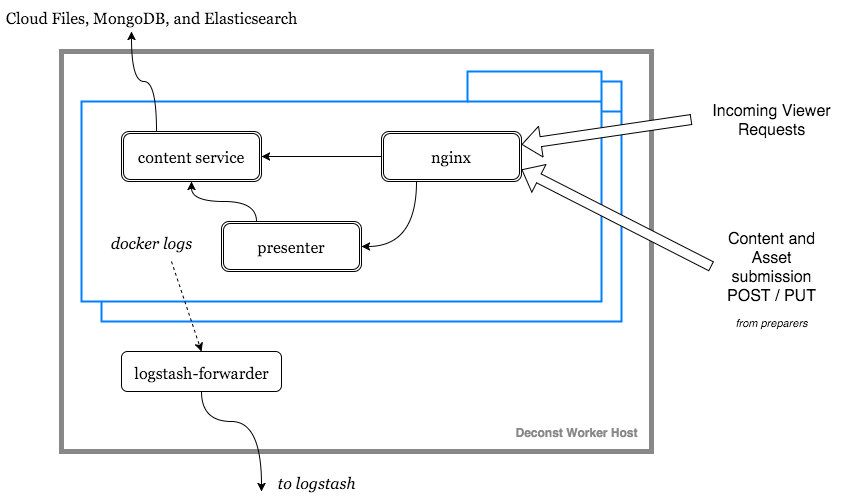
Each pod includes the following arrangement of interlinked service containers:
On the build host, a dedicated Strider CD continuous integration server manages cluster-internal and automatically created builds. It also includes a set of service containers that act as a staging environment that can be used to preview content in context before it’s merged and shipped.

Access to Strider is managed by membership in a GitHub organization or in teams within an organization, as configured in the instance’s credentials file.
Strider is prepopulated with a build for the instance’s control repository that preprocesses and submits site-wide assets to the content service, and automatically creates new content builds based on a list in a configuration file.
The asset preparer, content preparer, and submitter processes are run in isolated Docker containers, sharing a workspace with Strider by a data volume container.
Components
- preparer
Process responsible for converting a content repository into a directory tree of metadata envelopes, each of which contains one page of rendered HTML and associated metadata.
There is one preparer for each supported format of content repository; current, Sphinx and Jekyll. The preparer is executed by a CI/CD system on each commit to the repository.
- submitter
- Process responsible for traversing directories populated with metadata envelopes and asset files and submitting them to the content service. The submitter submits content and assets in bulk transactions and avoids submitting unchanged content.
- content service
- Service that accepts submissions and queries for the most recent metadata envelope associated with a specific content ID.
- presenter
- Accepts HTTP requests from users. Maps the requested presented URL to a content ID using the latest known version of the content mapping within the control repository, then accesses the requested metadata envelope using the content service. Injects the envelope into an appropriate template and send the final HTML back in an HTTP response.
- nginx
- Reverse proxy that accepts requests from off of the host, terminates TLS, and delegates to the local presenter and content service.
- strider
- A continuous integration server integrated with Deconst to provide on-cluster preparer and submitter runs.
Lifecycle of an HTTP Request
When a content consumer initiates an HTTPS request:
- The Cloud Load Balancer proxies the request to one of the registered nginx containers.
- nginx terminates TLS and, in turn, proxies the request to its linked presenter.
- The presenter queries its content map with the presented URL to discover the content ID of the content that should be rendered at that path.
- Next, the presenter queries the content service to acquire the content for that ID. The content service locates the appropriate metadata envelope, all site-wide assets, and performs any necessary post-processing.
- If any addenda are requested by the current envelope, each addenda envelope is fetched from the content service.
- The presenter locates the Nunjucks template that should be used to decorate the raw content based on a regular expression match on the presented URL. If no template is routed, this request is skipped and a null layout (that renders the envelope’s body directly) is used.
- The presenter renders the metadata envelope using the layout. The resulting HTML document is returned to the user.
Lifecycle of a Control Repository Update
When a change is merged into the live branch of the control repository:
- A Strider build executes the asset preparer on the latest commit of
the repository. Stylesheets, javascript, images, and fonts found within the
assetsdirectory are compiled, concatenated, minified, and submitted to the content service to be fingerprinted, stored on the CDN-enabled asset container, and made available as global assets to all metadata envelopes. - Once all assets have been published, the preparer sends the latest git commit SHA of the control repository to the content service, where it’s stored in MongoDB.
- Each entry within the
content-repositories.jsonfile is checked against the list of strider builds. If any new entries have been added, a content build is created and configured with a newly issued API key. - During each request, each presenter queries its linked content service for the active control repository SHA. If it doesn’t match last-loaded control repository SHA, the presenter triggers an asynchronous update.
- If successful, the new content and template mappings, redirects, and templates are atomically installed. Otherwise, the presenter logs an error with the details and waits for further changes before attempting to reload.
Lifecycle of a Content Repository Update
When a change is merged into the live branch of a content repository:
- A Strider build scans the latest commit of the repository for directories
containing
_deconst.jsonfiles and executes the appropriate preparer within a Docker container that’s given each context. - The preparer copies each referenced asset to an asset output directory within the shared workspace container. The offset of the asset reference is saved in an “asset_offsets” map.
- The preparer generates a metadata envelope for each page that would be rendered, assigns it a content ID using a configured base ID, and writes it to the envelope output directory.
- The submitter queries the content service with the SHA-256 fingerprints of each asset in the asset directory. If any assets are missing or have changed, the submitter bulk-uploads them to the content service API. If more than 30MB of assets need to be uploaded, assets are uploaded in batches of just over 30MB to avoid overwhelming the upload process.
- The submitter inserts the public CDN URLs of each asset into the body of each metadata envelope at the recorded offsets and removes the “asset_offsets” key.
- The submitter queries the content service with the SHA-256 fingerprint of a stable (key-sorted) representation of each envelope. Any envelopes that have been changed are bulk-uploaded to the content service.